How to Manage a Global Content Team (and Scale Multilingual Output)
Managing a content team across languages, time zones, and deadlines requires structure, clarity, and automated pipelines. Discover practical methods to keep your global team productive without burning out.


How to Manage a Global Content Team (and Scale Multilingual Output)
If you lead a content team, especially one publishing across several languages, your day likely does not start with strategy. It starts with 50 unread emails, Slack messages, and 3 different spreadsheets that are all supposedly the latest version.
By 2:00 PM, you have spent most of your cognitive energy manually moving files between writers, editors, translators, and stakeholders, and barely any on the strategy you were actually hired to lead.
1. The Coordinator's Trap: Why Manual Handoffs Break Down
This is the coordinator's trap, and it is a deceptive cycle. When a team is small, manual coordination can feel helpful: you ping a writer a reminder, you email a file to a designer, it takes only 30 seconds. But as your team scales, or as you start creating multi-language content, those 30-second tasks add up fast, and every language you add is another handoff, another file version, and another person waiting on you personally to move something forward.
When you spend your day in file management, two things happen:
- You lose sight of the why. You are so focused on getting a blog post published by Thursday that you do not notice the topic no longer aligns with your company's goals.
- You become a bottleneck. If you take a vacation, the work stops, because the system lives inside your brain, not in a process anyone else can run.
The solution is not to work faster or put in overtime. You need automation, and for a team publishing in more than one language, that automation has to include translation and localization, not just editorial review.
2. Automating Localization and CMS Workflows
The difference between a burned-out manager and a great leader often lies in their tool stack. If you are handling international markets, tasks such as exporting strings, emailing them to translators, and re-importing them into your CMS by hand are exactly the kind of manual handoff that does not scale.
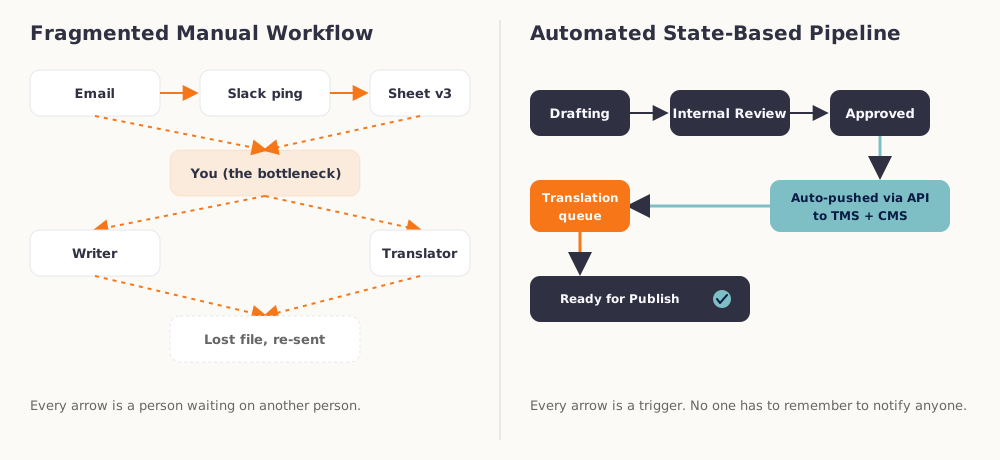
Successful teams stop treating localization as a periodic handoff and start treating it as a continuous, API-driven pipeline. Instead of a batch export every few weeks, approved content is pushed to the translation queue the moment it clears editorial review, translated, and synced back into the CMS automatically, no one has to remember to kick off the process.
Why Specialized Tools Matter
A general-purpose tool like a Google Sheet is a blank canvas, but it is also a trap. It requires manual updates. A specialized system, whether a dedicated translation management system or a headless CMS built for multi-platform publishing, uses triggers instead. When a writer finishes a draft, the system notifies the editor. When the editor approves it, the content is pushed straight to the translation queue or the staging site, no export, no email, no re-import.
That shift matters more the more languages you run. Managing multilingual content pipelines by hand does not just cost you time, it introduces a version-control risk every single handoff: the wrong file, an outdated draft, a translation that never made it back into the CMS.
Setting Guidelines for AI Tool Usage
AI drafting and AI-assisted translation both belong in a modern content stack, but only inside guardrails your team has actually agreed on. Before AI tools go into the pipeline, define:
- Quality control, meaning every AI-drafted or AI-translated piece gets a defined human review step before publish, not an optional one.
- Brand voice alignment, a documented style guide the AI is prompted against, so output does not drift toward generic AI phrasing over time.
- Original reporting standards, since AI is a strong drafting and localization accelerant but a poor substitute for a real interview, a real data point, or a real source, the things that make content worth publishing in the first place.
Skipping this step does not make AI adoption faster. It just moves the cleanup cost from before publish to after, when a factual error or an off-brand paragraph is already live.
Scaling your content operations across international markets?
Eliminate manual copy-pasting and translation delays. Our automated TMS and CMS integration solutions keep your global content team moving fast without sacrificing quality.
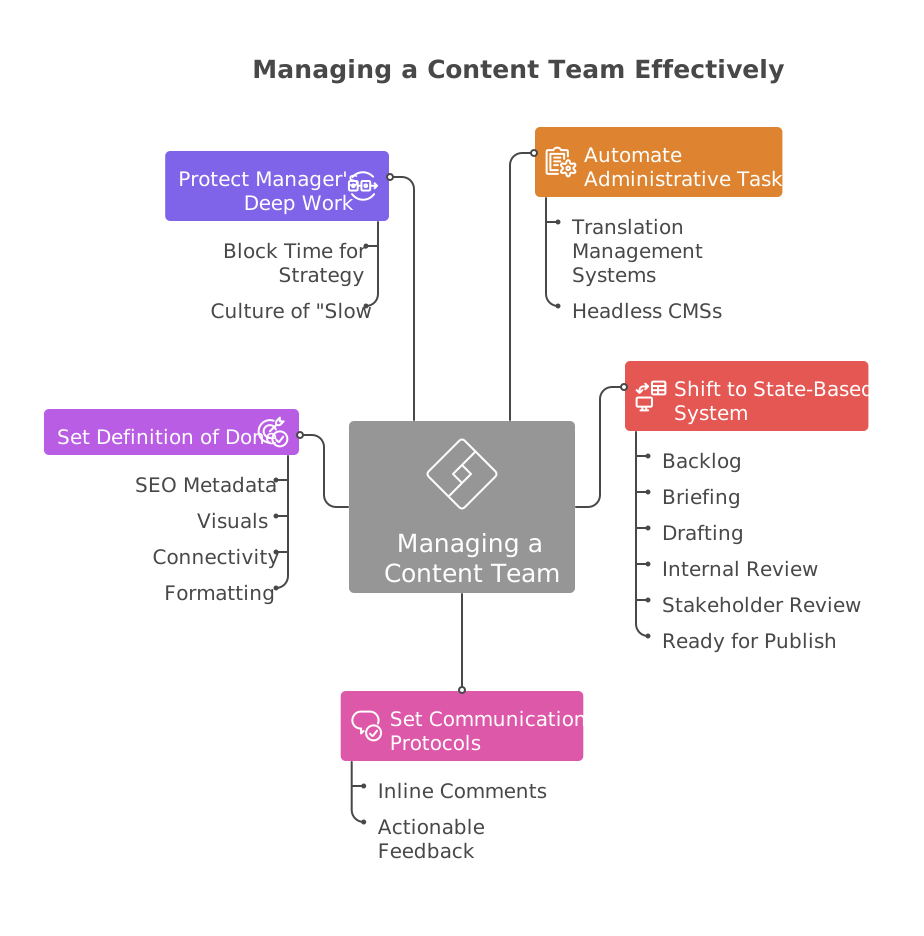
3. Shifting to a State-Based Board System (Asana/Jira)
The inbox method of management, responding to whatever is at the top of your feed, is stressful. You are constantly waiting for the next ping to tell you what to do, which makes you reactive rather than proactive. To fix this, move all work into a state-based system.
Every single asset must live on a central board (Jira, Asana, ClickUp, or Monday). Follow the golden rule: if it is not on the board, it does not exist.
A workflow for scaling localized content operations typically looks like this:
- Backlog: Ideas that have been vetted but not yet assigned.
- Briefing: Work that is currently being scoped (no creative work allowed yet).
- Drafting: The creator is actively working.
- Internal Review: The editor is checking for voice and tone.
- Translation Queue: The approved asset is out for translation and localization review.
- Stakeholder Review: Legal, Product, or Subject Matter Experts are weighing in.
- Ready for Publish: The asset is 100 percent approved, translated, and formatted.
The same discipline applies to how requests reach the board. If a stakeholder asks you to quickly do something via Slack, your response should be a template: "I may lose track of that in Slack. Can you create a ticket?"
This protects your team's bandwidth and your own mental health, and it keeps the board, not your memory, as the single source of truth.
Quick 15-minute sync meetings are where content productivity goes to die alongside this system. For a writer or designer, an 11:00 AM meeting does not just take 15 minutes, it breaks their flow state, costing them the hour before and the hour after. Establish clear protocols for feedback instead:
- Feedback happens directly within the asset (Google Doc comments, Figma annotations, or PM tool threads), never in a synchronous call.
- Comments like "Make this pop" or "I don't like this" are banned. Feedback must be actionable: "The tone here is too formal, let's use more contractions to match our brand voice."
This creates a historical record. When a writer or translator revisits a draft three days later, they do not have to remember what was said out loud in a meeting nobody wrote down.
4. Defining Your "Definition of Done" for Localized Assets
A large portion of manager burnout comes from the ping-pong effect: sending an asset back and forth for small, avoidable mistakes.
"You forgot the SEO title." "Where's the featured image?" "This link is broken." "The translation never got signed off."
This happens because your team has different definitions of finished. Fix it with a strict Definition of Done (DoD) checklist for every asset type, one that does not stop at the English version.
Content Delivery Checklist
A blog post, or any localized asset, cannot move to "Ready for Publish" until every item here is checked:
- SEO metadata. Meta description and title tags are written, in every language the asset ships in.
- Visuals. All images have descriptive alt text and are compressed for web speed.
- Connectivity. All internal and external links have been click-tested, per locale, since a link that works in English can 404 once localized.
- Formatting. H1, H2, and H3 tags are correctly applied, and text expansion in the translated version has not broken the layout.
- Translation sign-off. A native-speaking reviewer, not just the original translator, has approved the localized version against this same checklist.
When the standard is objective, documented, and covers every language you publish in, quality control happens before the file reaches your desk. Your job changes from "correcting typos" to "evaluating the strength of the argument," in whichever language a reader encounters it. The same discipline is worth borrowing from general project management practice, including how other teams build content into their own Definition of Done.
Protect Your Own Deep Work Time
Most content managers view their role as a service desk: they exist to be available for everyone else. This is a mistake. To lead strategically, especially across multiple markets and time zones, you need your own deep work hours.
Block out 90 minutes every morning, before you open Slack or email, to focus on big-picture items:
- Reviewing content performance analytics, market by market.
- Adjusting the content roadmap based on upcoming product launches.
- Auditing old content, in every language, for update opportunities.
Normalize that not responding instantly is okay. If a question is truly an emergency, people will call you, and if it is in Slack, it can usually wait 90 minutes.
When you lead by example, your team feels safe doing the same, which reduces turnover and gives everyone the space creative and linguistic work actually needs.
Great content management, at any scale and in any number of languages, is not about working the longest hours. It is about building a system, automated infrastructure, state-based workflows, feedback protocols, and a translation pipeline that runs on triggers instead of emails, that functions without your constant manual intervention.
Lead the system, and let the system lead the team.