Staying Safe Against Online Dangers
Online threats grew teeth in 2026, with AI phishing, deepfake calls, and ransomware now aimed straight at businesses. Learn the practical habits that keep your team and your client data safe, then get a free quote from BeTranslated.


Protect Your Business From Online Threats in 2026
It is easy to assume the online attacks you read about will never reach you, yet in business you are as much a target as anyone, often more.
The same holds in your personal life, though at work the risk multiplies, because every inbox, login, and connected tool becomes a door someone might try.
Learning to stay safe takes surprisingly little time, and it can spare you a world of trouble later, which makes it a far smarter bet than hoping the problem skips you.
Here is what has changed for 2026, and how to protect your business against it.
Build a Culture of Awareness
Start with the cheapest defense you have, which is your own team.
Help everyone learn the ways your business can stay safe before you spend a cent on new tools.
Investment in security matters, of course, but hardware and software rarely hold up without the right habits behind them.
A baseline of knowledge keeps everyone alert and slows the slide into complacency.
Run short, regular training so your people learn to spot this year’s tricks, not last year’s.
Recent data backs the effort up.
Before any training, 33.1% of employees are prone to clicking a simulated phishing email; after 12 months of security training, the global rate drops to 4.1%, a reduction of 86%.Source: KnowBe4, "2025 Phishing by Industry Benchmarking Report", press release of May 13, 2025, covering 14.5 million users at 62,400 organizations
Watch for AI-Powered Scams and Deepfakes
The biggest change since this advice was first written is who, or what, now writes the scams.
Generative AI lets criminals produce polished, personalized phishing at scale.
Worse, those AI messages get clicked far more often than the clumsy old ones, because the spelling mistakes that used to give them away have vanished.
Voice cloning has caught up too, and a scammer now needs only a few seconds of audio to fake a colleague’s voice on a call.
The scale of the risk is real.
A finance employee at the engineering firm Arup agreed to send HK$200 million, about US$25.6 million, in 15 transactions after a video call with people he believed were the chief financial officer and colleagues; all of them turned out to be deepfakes.Source: CNN, "British engineering giant Arup revealed as $25 million deepfake scam victim", May 16, 2024
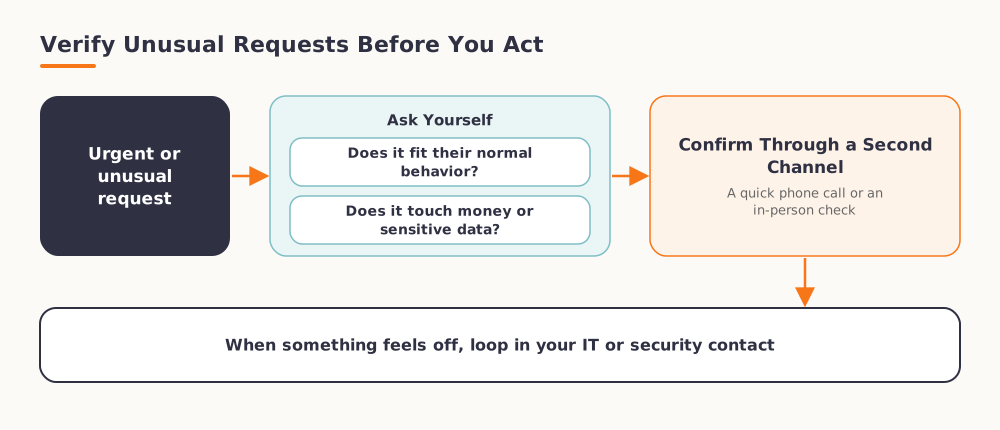
So treat urgent, unusual requests with a critical eye, whoever they seem to come from.
Ask whether the request fits the person’s normal behavior, whether it touches money or sensitive data, and confirm it through a second channel, a quick phone call or an in-person check, before you act.
When something feels off, loop in your IT or security contact rather than deciding alone.
Choose the Right Security Systems
“Get better security” is sound advice, and also frustratingly vague, given how many options sit in front of you.
Several broad systems can guard your network, and the modern, cloud-connected versions that update their defenses automatically tend to cost more, so weigh the price against what a breach could take from you.
Match the protection to each part of your business as well.
If you run APIs, restrict unauthorized access with API security solutions, and apply the same care to your intranet portal and any third-party tools you plug in.
Supply-chain attacks, where criminals slip in through a trusted vendor or plugin, have grown fast, so vet the software you connect as carefully as the doors you lock.
Move Beyond Passwords With Passkeys and MFA
Across work and home alike, most of us juggle more logins than we can ever remember.
Reusing one password everywhere leaves you exposed the moment any single site is breached.
Inventing a fresh password for each account, on the other hand, tends to produce weak ones or forgotten ones.
In a business the problem grows, since every staff member wrestles with the same trade-off.
Password managers earn their keep here, creating hard-to-guess passwords and storing them safely for easy retrieval.
Add multi-factor authentication on every account that offers it, and lean toward passkeys or an authenticator app rather than SMS codes, which attackers intercept more easily.
Prepare for “MFA fatigue” as well, where criminals spam approval prompts hoping a tired employee taps yes, so teach your team to reject any request they did not start themselves.
Back Up Like It Matters
Losing everything at once is a real fear, and backing up to the cloud answers a good part of it.
Some people hesitate, worried that cloud storage widens their exposure by putting data somewhere more reachable.
Businesses across every industry trust reputable cloud providers for exactly this, so it pays to understand how secure the right setup can be.
Ransomware makes backups more valuable than ever, because a clean, recent copy lets you recover without paying a criminal.
Keep physical backups as well, yet never rely on them alone, since fire, theft, or a failed drive in the office can wipe them out just as surely as any hacker.
A rule many teams follow keeps three copies of important data, on two kinds of media, with one stored off-site.
Guard the Data Your Clients Entrust to You
Running a translation agency, we handle confidential contracts, medical files, and financial records every day, so security sits inside the service rather than beside it.
Any business holding sensitive client information carries the same duty, and a single breach can cost far more than the tools that would have prevented it.
We share hard-won habits in our guides to cybersecurity for translation businesses, keeping documents secure, and spotting scammers before they reach your inbox.
Remote teams face their own risks, which we cover in our notes on cybersecurity for remote workers.
If you need translated content handled with that level of care, request a free quote and we will treat your data as our own.
Final Words
Staying safe online in 2026 is less about any single product and more about steady habits: train your people, question the unexpected, lock down every login, and back up all that matters.
Attackers keep getting smarter, so a little effort now buys you a lot of calm later.
Frequently Asked Questions
What is the biggest new online threat to businesses in 2026?
AI-generated scams top the list. Criminals now use generative AI to write flawless phishing and to clone voices and faces, so messages and calls look far more convincing than they did a year or two ago.
How can I tell if an email or call is an AI deepfake scam?
Look at the request, not just the sender. If it is urgent, involves money or sensitive data, or feels out of character, confirm it through a second channel such as a direct phone call before doing anything.
Are password managers actually safe to use?
Reputable password managers are far safer than reusing weak passwords across sites. They generate strong, unique logins and store them behind one protected vault, which you should pair with multi-factor authentication.
Is cloud backup safe for confidential business data?
Yes, when you choose a trusted provider and configure it well. Cloud backups protect you against ransomware and physical damage, and pairing them with an off-site copy gives you a reliable way to recover.
How often should my team do security training?
Short refreshers a few times a year work better than one long annual session. Regular training keeps staff aware of new scams, and studies show it sharply reduces the odds of someone clicking a malicious link.