AI Interpreter or Human Interpreter? How to Choose for Your Next Meeting
Teams, Google Meet, and Zoom can all translate speech now. Here is what each one does as of October 2026, where AI interpreting is reasonable, and where a human interpreter is the better call.


AI Interpreter or Human Interpreter? How to Choose for Your Next Meeting
Microsoft Teams, Google Meet, and Zoom can all translate speech now, so the real question is no longer whether AI interpreting exists. It is whether it belongs in your next meeting. The answer depends on what a mistake would cost, who is listening, and which languages are on the call.
This guide sorts meetings into three groups: where AI interpreting is reasonable, where a human interpreter is the better call, and where a hybrid setup fits. Product details come from each vendor's own documentation, checked on October 10, 2026, and they change often, so confirm anything that matters on the linked pages.
Three Things People Call "Interpreting"
Three different tools get lumped together, and mixing them up causes bad purchasing decisions.
- Translated captions show the speaker's words as text in another language. Nothing is spoken.
- AI speech translation produces a spoken translation, often in a synthetic voice, a few seconds behind the speaker.
- A human interpreter listens for meaning, renders it aloud in the other language, and answers for the result.
Microsoft describes its Teams Interpreter agent as three steps in a row.
Speech Recognition (ST): Converts spoken language into English text. Translation (MT): Translates English text into the selected language(s). Voice Generation (TTS): Produces translated speech in the target language.Source: Microsoft Support, "Interpreter in Microsoft Teams meetings and calls", 2026
Each step can add an error the next one cannot see. Because English text sits in the middle, a German-to-Japanese exchange passes through English on the way. That is our reading of Microsoft's description, not a claim Microsoft makes about accuracy.
A human interpreter holds the whole meeting in their head, notices when a term means something specific to your company, asks for a repeat, and works under a code of confidentiality.
What Teams, Meet, and Zoom Offer as of October 2026
| Platform | Feature | Languages | Who can use it |
|---|---|---|---|
| Microsoft Teams |  Interpreter agent (speech to speech) Interpreter agent (speech to speech) | Nine on Microsoft's admin page, ten on its support page | Users with a Microsoft Copilot license; guests cannot |
| Google Meet | Speech translation (speech to speech) | English paired with French, German, Hindi, Italian, Portuguese, or Spanish | Select Google Workspace and Google AI plans |
| Zoom |  Translated captions (text only) Translated captions (text only) | More than 30 spoken languages | Select Zoom Workplace plans or an add-on |
Teams. The Interpreter agent lists nine languages on Microsoft's admin page: Mandarin Chinese, English, French, German, Italian, Japanese, Korean, Portuguese, and Spanish. The user-facing support page adds Taiwanese as a tenth. It does not work in Teams events or in one-to-one calls placed over the phone network, and people who join anonymously or as guests cannot use it. On licensing, the admin page says:
20 hours of interpretation is included per user per month with a Microsoft Copilot license. Access beyond the hours included is subject to available capacity.Source: Microsoft Learn, "Manage Interpreter agent for your organization", 2026
Microsoft is also direct about where the tool is weakest:
Interpreter isn't optimized for meetings with rapid exchanges, interruptions, or overlapping dialogue, as the translation may take longer than the original speech, making it harder to follow and respond naturally. Interpretation of people's names, genders, or technical terms may be inaccurate.Source: Microsoft Support, "Interpreter in Microsoft Teams meetings and calls", 2026
Recordings capture only the original audio, and translated transcripts exist only live.
Google Meet. Speech translation became generally available to eligible Workspace customers on January 27, 2026, according to the Google Workspace Updates blog. As of October 10, 2026, Google's help page still lists English paired with six languages and states these limits:
Translations will be a few seconds delayed for completeness. [...] There's a 90-minute limit on Speech Translation per meeting. [...] Translation is available between English and: French, German, Hindi, Italian, Portuguese, Spanish.Source: Google Meet Help, "Learn about Speech Translation", accessed October 2026
Only one language pair can run in a meeting, and each participant must allow their own voice to be translated. On June 9, 2026, Google announced a model meant to widen coverage, and said it is not yet generally available:
Offering 70+ languages [...] We're launching this update in private preview for select business Google Workspace customers starting this month, followed by a broader rollout later this year.Source: Google, "Fluid, natural voice translation with Gemini 3.5 Live Translate", 2026
We found no Google post announcing general availability, so plan around the shorter list unless Google confirms your account is in the preview.
Zoom. Zoom's feature is translated captions, which are text only. Accounts need an eligible Zoom Workplace plan or the Translated Captions add-on, and the supported list covers more than 30 spoken languages. Zoom's own page adds two cautions:
Translated captions may not be accurate. [...] Some accounts in regulated industries like Healthcare and Higher Education may not have access to translated captions.Source: Zoom Support, "Enabling and configuring translated captions"
Where AI Interpretation Works
The good fits share a pattern: a low cost of error, forgiving listeners, a language pair on the vendor's list, and orderly speech.
- Internal stand-ups and status calls, where anyone can say "can you repeat that?" without consequence.
- Informational briefings in regular meetings, where slides carry the detail.
- First conversations with a colleague or supplier, when the goal is to get acquainted and not to commit.
A useful test is whether a wrong sentence can be corrected in the next minute at no cost. If a correction would arrive after a signature, a diagnosis, or a price, AI interpreting is the wrong tool.
Microsoft's own tips ask speakers to use short sentences, pause frequently, and simplify technical language. Run a five-minute dry run with the people who will be on the call.
What the Research Says, and What It Does Not
We did not find an independent, head-to-head accuracy comparison of these three platforms. Vendor-published accuracy numbers are not independent, so this guide quotes none.
One 2026 peer-reviewed paper surveyed interpreters in Greece, Cyprus, and Italy. It measures perceptions, not accuracy, and interpreters have a stake in the answer, so read it as one input:
The findings reveal widespread apprehension about the sustainability of interpreting as a career. At the same time, a number of respondents acknowledged that AI, if appropriately integrated, may support interpreters in their work and contribute to enhanced performance.Source: Petrocheilou, "Artificial Intelligence and the Future of Interpreting: Professional Interpreters' Perspectives", International Journal of Language, Translation and Intercultural Communication, 2026
Even skeptical professionals see a support role for AI, which points toward hybrid setups.
Where a Human Interpreter Is the Right Call
Reach for a person when a wrong sentence is costly, the setting is regulated, or the conditions are ones vendors warn about.
- Legal. Depositions, hearings, and contract signings can put every word on the record, and someone has to stand behind the rendering.
- Medical. Regulators write the standard around a qualified person, as the rule below shows.
- Negotiations. A softened qualifier or a dropped "unless" changes the deal. A human interpreter can ask what the speaker meant and is accountable for the result.
- Confidential material. Microsoft says a bot transmits meeting audio for cloud-based processing, and its default policy simulates each speaker's voice. Settle consent and data terms before the meeting.
- Rare languages and dialects. The lists are short, and Microsoft says some languages can be recognized but interpretation accuracy "isn't guaranteed."
- Accents, overlapping speech, and terminology. These are the conditions Microsoft's limits describe, so test with your real speakers and brief any interpreter with a glossary.
For health care, the U.S. rule under Section 1557 of the Affordable Care Act shows how a regulator frames it. It applies to covered health programs, not every meeting, so treat it as an example of a written standard and ask counsel what governs you.
When interpretation services are required under this part, a covered entity must offer a qualified interpreter in its health programs and activities.Source: 45 CFR 92.201(c)(1), Electronic Code of Federal Regulations, current as of October 7, 2026
The same regulation defines that interpreter as someone who interprets "without changes, omissions, or additions" and adheres to "generally accepted interpreter ethics principles, including client confidentiality." For the wider legal picture, our guide to language access under Title VI covers who pays and what the law requires.
Hybrid Setups That Work
Most meetings are not clearly one thing or the other, so several arrangements split the work.
- A human interpreter plus AI captions. Listeners hear the interpreter and read the captions as a reference.
- AI inside, humans outside. Run internal syncs with AI interpreting, and book interpreters for client, supplier, and regulator calls.
- A person monitoring the AI channel. A bilingual colleague listens to the AI output and steps in when it goes wrong. This only works if they are fluent in both languages and can interrupt.
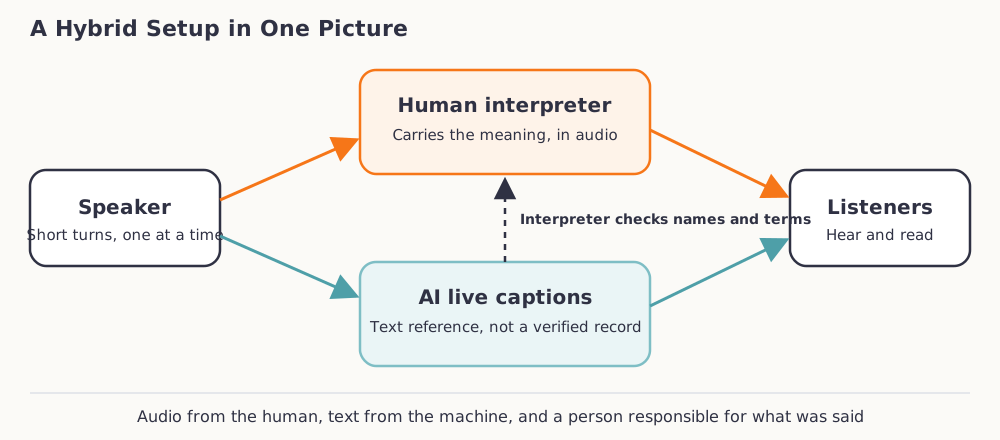
Teams and Zoom both support human interpreters inside the meeting, with limits. Microsoft documents its own:
You can add up to 16 different language pairs [...] Breakout rooms are not currently supported. [...] Language interpretation is not currently available in end-to-end encrypted (E2EE) Teams meetings. [...] Microsoft does not provide interpreters.Source: Microsoft Support, "Use language interpretation in Microsoft Teams meetings"
Zoom's language interpretation feature likewise cannot run in breakout rooms. When you need several languages or breakout sessions, dedicated remote simultaneous interpreting can fit better than the built-in channels. For a small meeting, consecutive interpreting, where the interpreter speaks after each segment, needs no special platform. If you are unsure which mode fits a given meeting, our consecutive vs simultaneous interpreting compares them side by side.
If you go with human interpreters inside your meeting tool, our guide to setting up interpretation in Zoom and Teams walks through the host settings step by step.
A Quick Decision Guide
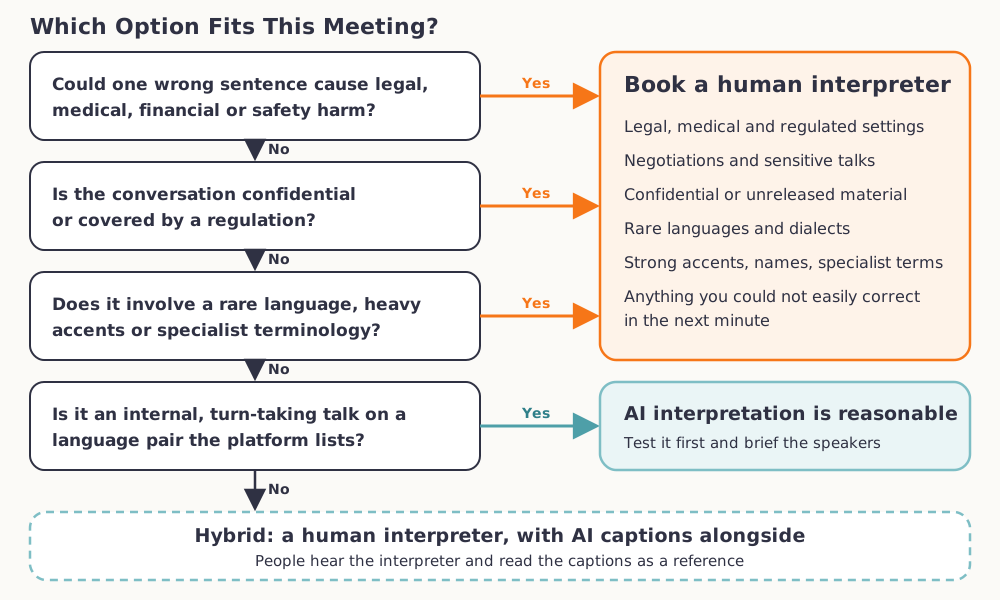
Start at the top and stop at the first yes. A yes to any of the first three questions means a human interpreter. If you reach the fourth and the answer is no, plan a hybrid setup.
Pre-Meeting Checklist
- Name the stakes. Write down what a wrong sentence would cost, and who would bear it.
- Check access. Confirm the languages, the license or plan, and whether guests are covered.
- Run a dry run. Use the real speakers and a page of their actual vocabulary.
- Send materials ahead. Share a term list, speaker names, and slides with any interpreter, and agree on voice simulation and recording.
- Pick a fallback. Decide who takes over when the AI channel fails.
If your meeting lands on the human side of the line, we provide remote interpretation and on-site interpreting services, and the interpretation FAQ answers common questions on formats and booking.
FAQ
Can AI replace a human interpreter?
For some internal, low-stakes meetings it can stand in. It does not replace a person where an error is costly, the setting is regulated, or the material is confidential.
Is AI interpretation accurate enough for business meetings?
The vendors' own pages are cautious. Microsoft warns that names, genders, and technical terms may be inaccurate, and Zoom says translated captions may not be accurate. Run a dry run with your real speakers before you rely on any tool.
Which languages do Teams, Meet, and Zoom support for AI interpreting?
As of October 2026, Teams lists nine to ten languages depending on the Microsoft page, Meet pairs English with six languages, and Zoom's text captions cover more than 30 spoken languages. Google has announced a wider Meet model in private preview, so check each vendor's page.
Do I need a license to use the Teams Interpreter agent?
Yes. Microsoft ties the agent to a Microsoft Copilot license, and guests and anonymous participants cannot use it. Ask your IT admin to confirm your settings.
Is AI interpretation safe for confidential meetings?
That depends on your data terms and consent process. Microsoft says audio is processed in the cloud, so review that with your IT and legal teams. A human interpreter works under a code of confidentiality.